Placeholders
Placeholders are fragments written as {{ name }} that the plugin replaces with the real value
at send time.
Writing:
Hi
{{ first_name }}, we got your details! Someone will reach out shortly.
The customer receives:
Hi John, we got your details! Someone will reach out shortly.
Inside the builder, placeholders show up highlighted and clickable in the message field, with a warning when the chosen placeholder does not exist on the workflow's trigger.
Every placeholder declares which triggers it works on. Since version 2.1.0 that applies at send time too, not only in the preview: a placeholder outside the trigger's context is left as-is instead of resolving to a wrong value. Placeholders marked as global work on any trigger.
WordPress
| Placeholder | Triggers | Description |
|---|---|---|
{{ first_name }} | all | The user's first name |
{{ last_name }} | all | The user's last name |
{{ email }} | all | The user's e-mail |
{{ site_url }} | all | The site URL |
{{ site_name }} | all | The site name |
{{ current_date }} | all | Today's date |
{{ user_meta[META_KEY] }} | all | A user meta value. Replace META_KEY with the key you want, e.g. billing_phone |
{{ post_title }} | post status changed | The post title |
{{ post_date }} | post status changed | The publish date |
{{ post_content }} | post status changed | The post content, text only |
{{ post_link }} | post status changed | The post link |
{{ post_tags }} | post status changed | The post tags, comma separated |
{{ post_categories }} | post status changed | The post categories, comma separated |
{{ post_featured_image }} | post status changed | The featured image URL |
{{ reset_password_link }} | password reset requested | The password reset link |
WooCommerce
In most cases the object being processed is the order.
| Placeholder | Description |
|---|---|
{{ wc_billing_first_name }} | Customer's billing first name |
{{ wc_billing_last_name }} | Customer's billing last name |
{{ wc_billing_email }} | Billing e-mail |
{{ wc_billing_phone }} | Billing phone |
{{ wc_shipping_phone }} | Shipping phone |
{{ wc_order_number }} | Order number |
{{ wc_order_status }} | Current order status |
{{ wc_order_date }} | Order date |
{{ wc_order_total }} | Order total |
{{ wc_currency_symbol }} | The order's currency symbol |
{{ wc_total_discount }} | Total discount applied |
{{ wc_total_tax }} | Total tax |
{{ wc_total_refunded }} | Total refunded |
{{ wc_coupon_codes }} | Coupon codes used on the order |
{{ wc_payment_method_title }} | Payment method title |
{{ wc_payment_url }} | The order's payment URL |
{{ wc_billing_full_address }} | Full billing address (format configurable in the WooCommerce options) |
{{ wc_shipping_full_address }} | Full shipping address (format configurable in the WooCommerce options) |
{{ wc_shipping_address }} | Shipping address in readable form |
{{ wc_purchased_items }} | Purchased products, with name and quantity, one per line |
{{ wc_review_links }} | Review link for each purchased product, one per line |
{{ wc_checkout_field=[FIELD_ID] }} | The value of a checkout field. Replace FIELD_ID with the field ID, e.g. billing_email |
Digital products
Available from version 2.1.0, and only resolved once download access has been granted.
| Placeholder | Description |
|---|---|
{{ wc_downloadable_items }} | Name of each digital product in the order, one per line |
{{ wc_download_links }} | Name and link of each digital file, one per line |
{{ wc_download_urls }} | Download links only, without the file name, one per line |
{{ wc_downloads_expiry }} | Expiry date of the download access. Returns the closest date when files expire on different dates |
{{ wc_downloads_remaining }} | How many downloads the customer has left. Returns the smallest when files have different limits |
{{ wc_account_downloads_url }} | Link to the downloads area in the customer's account |
{{ wc_download_link=[PRODUCT_ID] }} | Download links for one specific product. Replace PRODUCT_ID with the product ID, e.g. 128 |
Coupons created by the workflow
Available after the Create coupon action in the same workflow.
| Placeholder | Description |
|---|---|
{{ joinotify_coupon_code }} | The coupon code |
{{ joinotify_coupon_description }} | The coupon description |
{{ joinotify_coupon_discount_type }} | Discount type — percentage or fixed amount |
{{ joinotify_coupon_discount_value }} | Discount amount |
{{ joinotify_coupon_discount_formatted }} | Amount formatted with currency or percentage, e.g. 10% |
{{ joinotify_coupon_expires }} | Coupon expiry, e.g. "Expires in 1 hour" |
Loops
Available inside the body of the Loop action, from version 2.2.0. They work in every field of the action — caption, media URL, attachment URL and recipient.
| Placeholder | Description |
|---|---|
{{ loop_value }} | The current item's value |
{{ loop_index }} | The item index, starting at zero |
{{ loop_number }} | The item number, starting at one |
{{ loop_count }} | Total items in the collection |
{{ loop_file_name }} | The item's file name |
{{ loop_download_url }} | The item's download link |
{{ loop_product_name }} | The item's product name |
{{ loop_product_id }} | The item's product ID |
{{ loop_item_name }} | The item's name |
{{ loop_item_quantity }} | The item's quantity |
Forms
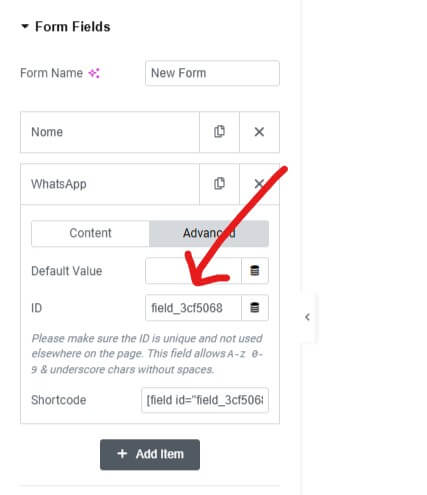
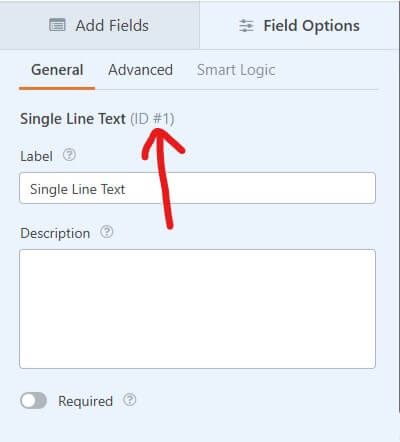
Elementor and WPForms expose the same placeholder, which reads the value of any field on the submitted form.
| Placeholder | Description |
|---|---|
{{ field_id=[FIELD_ID] }} | The value of a form field |
Replace FIELD_ID with the field ID. In the Elementor example below it would be
{{ field_id=[field_3cf5068] }}; in the WPForms one, {{ field_id=[1] }}.
Custom placeholders
From version 2.0.0 you can create your own placeholders straight in the builder, from content types and site fields — WooCommerce orders included — without writing code. They show up in the same list as the built-in ones.
For placeholders that need logic, use the Joinotify/Builder/Placeholders_List filter or the
joinotify_register_placeholders() helper; see
Developer resources.
WhatsApp formatting
The message editor already converts visual formatting (bold, italic, emoji) to WhatsApp's own syntax. If you prefer to type it directly, the syntax is WhatsApp's — it is processed on Meta's servers and cannot be turned off.
| Effect | Syntax |
|---|---|
| Italic | _text_ |
| Bold | *text* |
~text~ | |
Monospace | three backticks before and after |
| Bulleted list | * text or - text per line |
| Numbered list | 1. text per line |